
Last Updated
July 13, 2026
How to Add a QR Code in TikTok Videos (That Actually Gets Scans)
How-To
Most creators who Google this question end up with two options: slap a static QR sticker over their footage, or add a graphic in post that looks like an afterthought. Neither one works well. The QR code is either barely visible, covers something important, or disappears before anyone can scan it. And a lot of the time, TikTok's own interface overlaps it entirely.
In this guide, you'll learn how to add a QR code in TikTok video the right way - where to place it safely, how long it should stay on screen, and a workflow built specifically for short-form videos, so the QR code actually gets scanned instead of just sitting on screen doing nothing.
First: Why Add a QR Code to a TikTok Video at All?

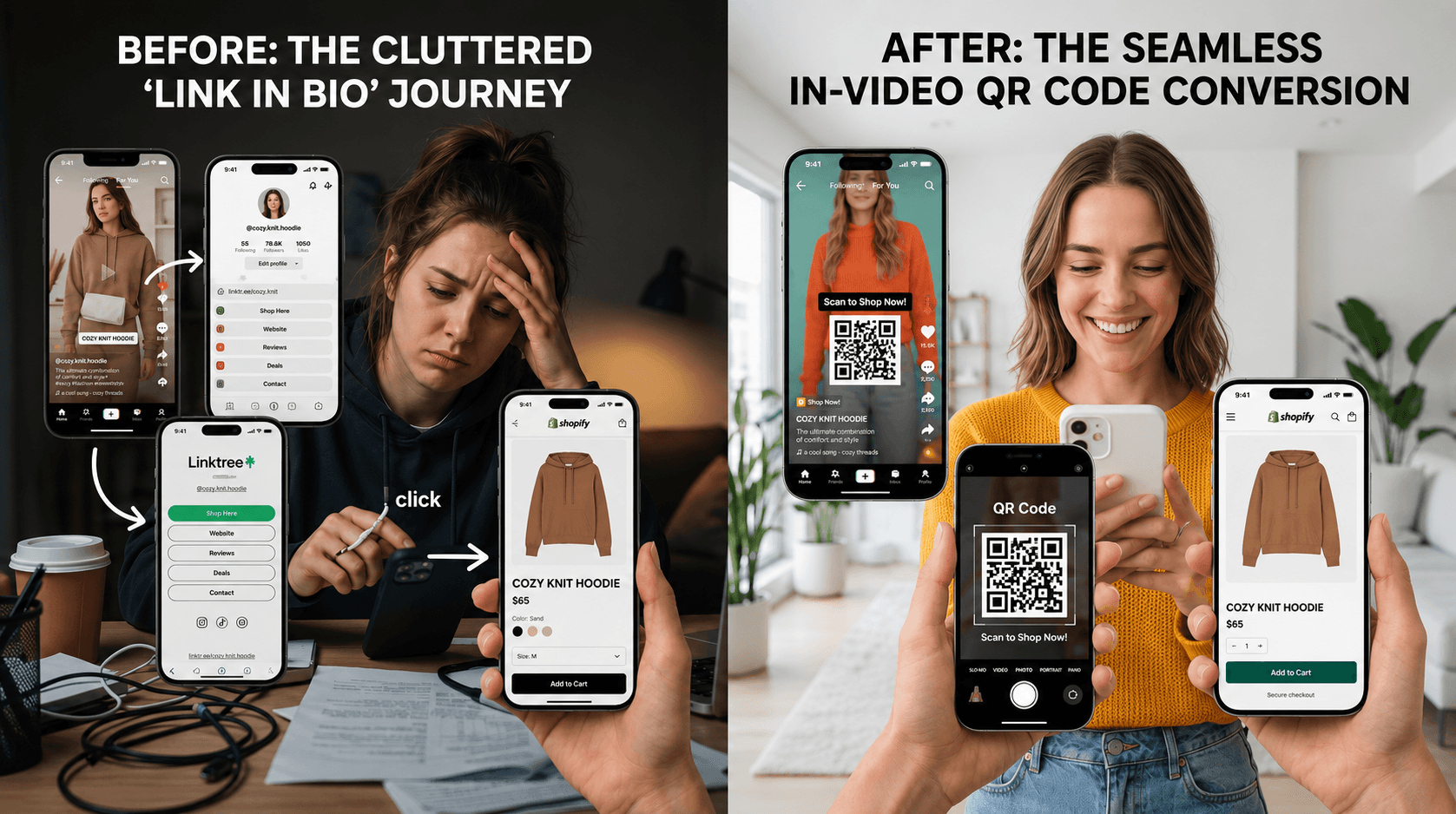
TikTok is an attention window, not a website. The moment someone feels interested is the exact moment they need a frictionless path to act. Traditional link-in-bio funnels create unnecessary friction while the In-video QR codes collapse this entire process into a single scan.
If you've been sending viewers to your bio link, you already know the problem. You say 'link in bio,' they stop watching, navigate to your profile, look through your bio tools, click through - and by the time they get anywhere, they've either lost interest or gotten distracted by the next video in their feed.
According to Tapmy's 2026 link-in-bio CTR benchmarks, the average link in bio CTR (click-through rate) is around 1%.[1] That means 99 out of every 100 people who watch your video never take the action you wanted them to take.
An in-video QR code changes the conversion model entirely. Instead of asking viewers to go find your link after the video ends, the QR is right there in the frame while they're watching. They scan it with a second device or use a screenshot + Google Lens method, and they land directly on your destination page - no profile visit, no link-in-bio tool, no detour.
Internal SnapScan conversion data suggests that the in-video QR scan rates average around 4.5% - compared to the ~1% benchmark for link-in-bio clicks, from the same audience watching the same content.[2] The difference isn’t magic. It’s just fewer steps between interest and action. That gap is exactly what makes TikTok conversion strategy so dependent on where you put the call to action - during the video, not after it. For a deeper look at how this conversion model works in practice, see how to turn video views into conversions.
The Problem With Most QR Code Tools
Most creators hit the same wall. They start with Canva or grab a free QR generator, slap the static QR code into their video editor, export it, post it - and then watch it disappear under TikTok's UI. Or it's visible but nobody scans it because it's the size of a thumbnail and gone in two seconds.
First, they generate a static QR code image and try to place it manually inside their video editor. No built-in safe-zone guidance, no animation options, no timing control. They export, upload to TikTok - and then realize the QR code is sitting right underneath TikTok's username label, or behind the like/comment buttons on the right edge of the screen. It's invisible.
Second, even when placement is right, the code is often too small to scan on mobile. A QR code that looks fine on desktop looks like a postage stamp when someone's holding their phone 12 inches from their face.
Third and most significant issue, the static QR workflows don't support dynamic links, analytics or video-level attribution. The destination is fixed. Try to Change your product page URL, run a different campaign, redirect to a seasonal offer - you can't. The code is baked in. You'd need to re-render and re-upload every single video.
The core problem with generic QR tools for TikTok:
No platform-specific safe-zone awareness, no size optimization for mobile, and no ability to update the destination after publishing. They weren't built for short-form video - and it shows.
How to Add a QR Code to a TikTok Video With SnapScan
SnapScan was designed specifically for this - see the full platform features - to add QR to video content across TikTok, Instagram Reels, YouTube Shorts, Snapchat, and Facebook, with placement, sizing, and timing handled so you're not guessing. Here's a detailed visual step-by-step walkthrough of the complete SnapScan workflow, from creating your QR source and destination to customizing design, adding your video, optimizing placement, previewing, and publishing your final in-video QR asset. However, the process can be summarized in five simple steps:
Step 1 - Add your destination link.
Paste your affiliate link, product page, booking form, lead magnet, or any URL meant for converting and monetization. This becomes the destination when someone scans the code. You can change this destination at any time - even after the video is live - without touching the video.
Step 2 - Customize the look.
Adjust colors, style, and branding so the TikTok QR code fits your visual aesthetic. A QR code that looks designed gets scanned more than one that looks pasted on.
Step 3 - Upload your video and set timing.
This is the step that generic tools skip entirely. You control the exact second the QR code appears, how long it stays on screen, what animation it enters with, and what text CTA accompanies it. SnapScan handles the timing so you're not guessing.
Step 4 - Generate your in-video QR.
SnapScan automatically places the QR code placement TikTok-optimized version with pixel-perfect positioning. You review it, confirm the safe zone, and it's ready to export.
Step 5 - Download and post as usual.
Export the video, upload it to TikTok exactly the way you normally would. The QR code is embedded in the video file itself. No external apps, no link in caption required.
TikTok Safe-Zone Placement: Where to Put Your QR Code

Figure 1: TikTok Safe Zone Map for QR Code Placement
TikTok's interface overlays several fixed UI elements on every video. If your QR code lands under any of them, it won't be scannable - and your viewer won't even know it's there. Here's what you're working around:
The bottom-left corner is permanently occupied by the creator username and caption text. The right edge of the screen - from roughly mid-frame to the bottom - holds the like, comment, share, and follow buttons. The top-right corner has the sound/music info bar.
That leaves two reliable safe zones for a scannable QR TikTok placement. The first is the upper center of the frame - above where the caption appears, but below the very top edge. The second is mid-frame center, which is generally clear on both sides of a portrait video as long as you avoid the right edge interaction zone.
QR Visibility Rules for TikTok:
- Minimum ~25-30% of frame width on mobile
- High contrast required: white QR on dark background or dark QR on light background
- Appear for at least 3-5 seconds - enough for a viewer to recognize it and prepare to scan
- Avoid bottom-left, right edge, and top-right corners at all times
SnapScan provides pre-built safe-zone templates for TikTok, Instagram Reels, YouTube Shorts, Snapchat, and Facebook so none of this requires manual calculation on your end. [2]
How Long Should Your QR Code Appear on Screen?
Timing is one of the most overlooked parts of adding a QR code in TikTok video content. A QR code that flashes for half a second is useless. But one that covers your face for the entire video will annoy your viewers and kill your watch time - which is exactly what TikTok's algorithm measures most.
According to OpusClip's 2026 analysis of TikTok's algorithm, watch time and video completion rate are the two signals TikTok weights most heavily when deciding how widely to distribute your content.[3] A QR code that breaks the visual experience at the wrong moment can hurt those numbers.
One option that actually works: bring the QR in at the natural CTA moment - usually the last 20-30% of the video - and leave it on screen through the end. It doesn't interrupt anything, and it's there long enough for anyone still watching (your most interested viewers) to scan it.
SnapScan's timing controls let you set the exact entry point and duration. You can also add a text CTA alongside it - something like 'Scan to get the link' - so viewers know what to do without needing to be told in your voiceover.
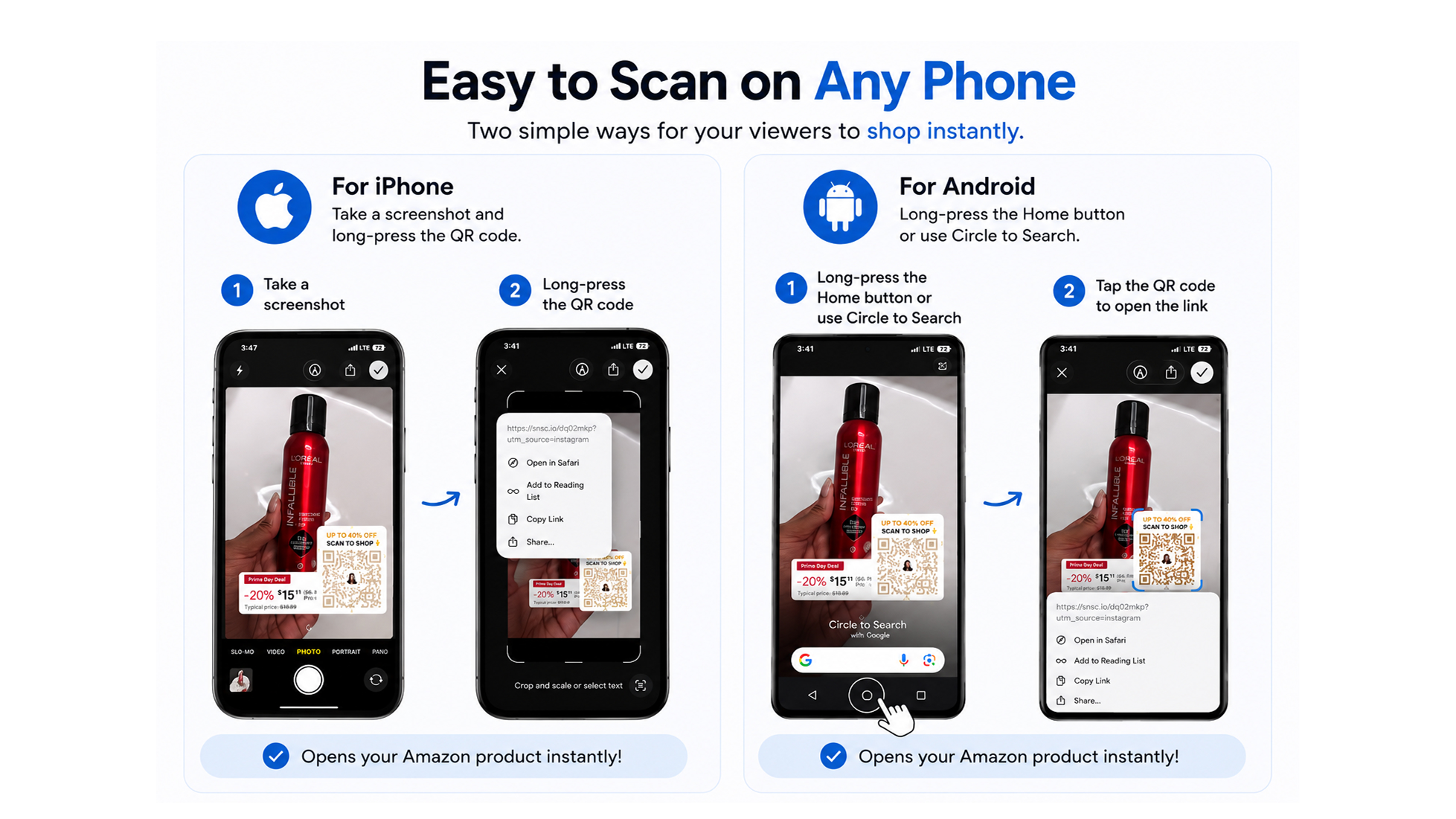
How To Scan a TikTok QR Code?
The first question viewers have “but how?!, My camera is already my phone”.They can't point it at itself - so how does it work?
Two common methods cover almost everyone:
- On iPhone (iOS 15+): pause the video, screenshot the frame, open it in Photos, long-press the QR - a link popup appears in seconds, no app needed.
- On Android: Circle to Search on Pixel 6+ and Samsung Galaxy S24+ lets you draw a circle around the QR while the video is still playing and it decodes on the spot. Any other Android, screenshot + Google Lens does the same job in an extra step.
Once a viewer's done it once, it takes under 10 seconds. For a full breakdown of every method by device, see this guide on scanning in-video QR codes.
What Happens After Someone Scans?
When a viewer scans your in-video QR code, they go directly to whatever destination URL you set. No bio link page, no Linktree, no third-party tool to navigate. Straight to the product page, the lead form, the booking calendar, the checkout - wherever you want them.
The other thing that changes - beyond just cutting steps - is that every scan is tracked back to its source. According to SnapScan (snapscan.link), the platform captures scan data at the video level - meaning you can see exactly which TikTok drove each scan, what device the viewer was on, their geographic location, and when the scan happened.[2]
For context on why this matters: with link-in-bio, your attribution stops at “someone clicked the link.” You don't know which video, which campaign, or which moment actually converted. When viewers scan QR video codes through SnapScan, that data trail stays intact - from watch to scan to action - attributed back to the specific video that drove it.
And because the destination is a dynamic link - not a static QR - you can change where it points at any time. If you run a limited-time campaign and the offer expires, you redirect to your main product page. No need to re-render or re-upload the video.
The Difference Between a QR Code That Gets Scans and One That Doesn't
Most QR codes in TikTok videos don't get scanned - and it's usually not because viewers weren't interested. It's because the code was placed in the wrong spot, appeared for two seconds, was too small to read on a phone screen, or landed under TikTok's UI.
The ones that get scanned share a few things in common. They're visible in a clean safe zone for long enough that viewers actually notice them. They have a clear text CTA nearby so viewers know why to scan. They point to a destination that's relevant to the video - not a generic bio link page.
Baymard Institute found that 18% of US shoppers abandon checkout specifically because the process is too long or complicated.[4] Those are people who already had their wallet out. They'd decided to buy. Friction still beat them. A TikTok viewer who's still on the fence has an even lower tolerance for it. The path has to be short and obvious at the exact moment they're interested - not three steps later.
Adding a TikTok QR code the right way isn't about the technology. A solid TikTok QR strategy is about meeting your viewer where they are - in the video, at the peak of their interest - and making the next step so obvious they barely have to think about it.
Frequently Asked Questions
Can TikTok users scan QR codes?
Yes. TikTok users can scan QR codes embedded directly inside videos. Most viewers either use a second device to scan the code or take a screenshot and scan it using built-in tools like Google Lens or iPhone Photos.
Can you scan a QR code from the same phone?
Yes. On iPhone, users can screenshot the video and long-press the QR code inside the Photos app. On Android, Google Lens and Circle to Search can detect QR codes directly from screenshots, and in some cases, while the video is still playing.
What is the best QR code size for TikTok?
For reliable mobile scanning, QR codes should typically occupy around 25-30% of the video frame width. Smaller QR codes may look fine on desktop previews but become difficult to scan on mobile screens.
Do QR codes reduce watch time on TikTok?
They can, if they're poorly placed or appear too early. A large QR code covering important visuals can interrupt the viewing experience. The best-performing TikTok QR strategies introduce the code naturally near the CTA moment, usually during the final 20–30% of the video.
Can I change the destination link later?
Yes, if you're using a dynamic QR code platform like SnapScan. Dynamic QR codes let you update the destination URL even after the video has already been published, without needing to re-edit or re-upload the content.
Where should I place a QR code in a TikTok video?
The safest placements are usually the upper-center area or mid-frame center, away from TikTok's interface elements like captions, usernames, and engagement buttons. Avoid placing QR codes near the bottom-left corner or right edge of the screen.
Do in-video QR codes work better than link in bio?
Yes, In-video QR codes reduce friction by letting viewers take action instantly without leaving the video, opening a profile, or navigating through a link-in-bio page. That shorter conversion path often leads to higher engagement and stronger conversion intent.
Turn your next TikTok into a scannable conversion funnel in under 3 minutes.
Add your first in-video QR code and try SnapScan free at snapscan.link - See Pricing
REFERENCES
[1] Tapmy - "Link in Bio Click-Through Rate Benchmarks by Platform" (2026) https://tapmy.store/blog/link-in-bio-click-through-rate-benchmarks-by-platform-2026-data
[2] SnapScan - Official workflow, revenue modeling & safe-zone templates https://snapscan.link
[3] OpusClip Blog - "What Content Creators Need to Know About TikTok's New Algorithm in 2026" https://www.opus.pro/blog/tiktoks-new-algorithm-2026
[4] Baymard Institute - "Cart Abandonment Rate" (2024) https://baymard.com/lists/cart-abandonment-rate
Related Blogs

Affiliate Marketing
October 15, 2026
How to Drive More Traffic to Your LTK Shop From Product Review Videos
Social Media Marketing
October 5, 2026